Best Offline PDF Signature Software for Mac & Windows (2026)
📑 Table of Contents
Signing PDF documents doesn’t require an online service or a paid subscription. Whether you need to sign a contract, add your approval to a form, or create a digital signature with legal validity, you can do it all offline with free desktop tools.
Types of PDF Signatures
Before choosing a tool, understand the three types of PDF signatures:
- Electronic signature — an image of your handwritten signature placed on the document. Fast and simple but offers no cryptographic verification.
- Digital signature — a cryptographically signed signature backed by a certificate. Provides tamper detection and signer identity verification. Legally binding in most jurisdictions.
- Typed signature — your name rendered in a script font. The simplest option but the least formal.
For most business purposes, an electronic signature is sufficient. Digital signatures are needed for legal contracts, government forms, and regulated industries.
Top 5 Free Offline PDF Signature Tools
| Tool | Platforms | Draw Signature | Digital Signature | Batch Sign | Free Tier |
|---|---|---|---|---|---|
| PDFgear | Win / Mac | Yes | Yes | Yes | Unlimited |
| LibreOffice Draw | Win / Mac / Linux | Yes | No | No | Unlimited (open source) |
| Xournal++ | Win / Mac / Linux | Yes (stylus) | No | No | Unlimited (open source) |
| Preview (Mac) | macOS | Yes | Yes | No | Built-in |
| PDF24 Creator | Windows | Yes | No | No | Unlimited |
#1 Pick: PDFgear — Best Overall PDF Signing Tool
PDFgear offers both electronic and digital signatures in a single tool, making it the most versatile free option.
Creating an electronic signature:
- Open your PDF in PDFgear
- Click “Protect” → “Sign”
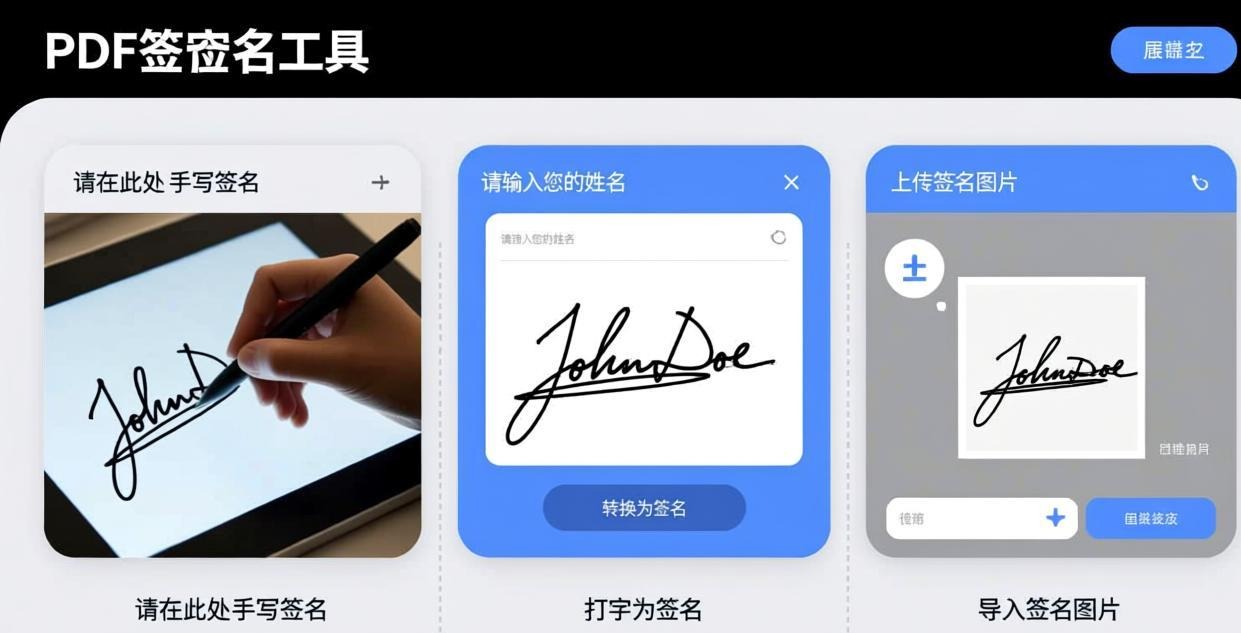
- Choose your signature method:
- Draw — use your mouse or stylus to draw your signature
- Type — enter your name and select a script font
- Image — import a scanned signature image
- Position and resize the signature on the document
- Save the signed PDF
Creating a digital signature:
- Click “Protect” → “Digital Signature”
- Create a new digital ID (name, organization, email)
- PDFgear generates a self-signed certificate
- Draw the signature box on the document
- Select your digital ID and click Sign
- The signature is cryptographically bound to the document
Key features:
- Signature presets — save multiple signatures (personal, business, informal)
- Timestamp — add a date/time stamp alongside your signature
- Batch signing — sign multiple documents with the same signature at once
- Signature validation — verify digital signatures on received documents
For more on annotation features, see our Best Free PDF Annotator Desktop (No Ads) guide.
#2 Pick: Preview (Mac) — Built-in macOS Signing
If you’re on a Mac, you already have a capable PDF signing tool built into Preview. It supports drawing signatures with your trackpad, camera, or iPhone.
How to sign with Preview:
- Open the PDF in Preview
- Click the Signature tool in the toolbar
- Create a signature:
- Trackpad — draw on your trackpad with your finger
- Camera — sign on paper and hold it up to your Mac’s camera
- iPhone/iPad — draw on your iOS device (synced via Continuity)
- Click to place the signature on the document
- Drag to position and resize
- Save the signed PDF
Preview also supports digital signatures through macOS Keychain certificates.
#3 Pick: Xournal++ — Best for Stylus Users
Xournal++ excels at handwritten signatures using a stylus or graphics tablet. Its pressure sensitivity makes signatures look natural.
How to sign with Xournal++:
- Open your PDF in Xournal++
- Select the pen tool and adjust thickness
- Sign directly on the document using your stylus
- Export as PDF with the signature flattened
Advantages for stylus users:
- Pressure sensitivity varies line thickness naturally
- Stroke smoothing makes signatures look professional
- Multiple pen profiles for different signing styles
How to Create a Professional Signature Image
If you prefer the image import method, here’s how to create a clean signature image:
- Sign on white paper using a dark pen (black or dark blue)
- Scan or photograph the signature in good lighting
- Crop tightly around the signature
- Remove the background using an image editor (make it transparent)
- Save as PNG with transparency
This gives you a reusable signature image that looks professional on any document background.
For password-protecting signed documents, see our Best Offline PDF Password Remover guide.
For more details, check out our PDF form filler guide.
For more details, check out our add page numbers guide.
Frequently Asked Questions
Are offline PDF signatures legally binding?
Electronic signatures are legally binding in most jurisdictions (ESIGN Act in the US, eIDAS in the EU) as long as all parties consent. Digital signatures with certificates provide stronger legal weight and tamper evidence.
What’s the difference between electronic and digital signatures?
An electronic signature is an image of your signature placed on the document. A digital signature uses cryptography to bind your identity to the document and detect any subsequent modifications. Digital signatures are harder to forge and provide verifiable proof of signing.
Can I sign a PDF on Mac without installing software?
Yes. Preview (built into macOS) can add both electronic and digital signatures. Open the PDF in Preview, click the Signature tool, and follow the prompts.
How do I sign multiple PDFs at once?
PDFgear supports batch signing — add your signature to the same position on multiple documents simultaneously. Load all the PDFs, place your signature, and apply it to all files at once.
Can I remove a signature from a PDF?
Electronic signatures (image overlays) can be removed by editing the PDF. Digital signatures cannot be removed without invalidating the document — any modification after a digital signature is applied will be detected.
Is a typed signature valid?
A typed signature (your name in a script font) is considered an electronic signature and is generally valid for non-critical documents. For contracts and legal documents, a drawn or digital signature is preferred.
📖 Recommended Reading
How to Reduce PDF File Size Offline Free (2026)
5 methods to shrink PDFs offline. Step-by-step for each approach.
Best Offline PDF Watermark Remover Desktop (2026)
5 free offline PDF watermark removers. Delete text and image watermarks without uploading.
How to Extract Pages from PDF Offline Free (2026)
4 free ways to extract PDF pages offline. Step-by-step for each tool.